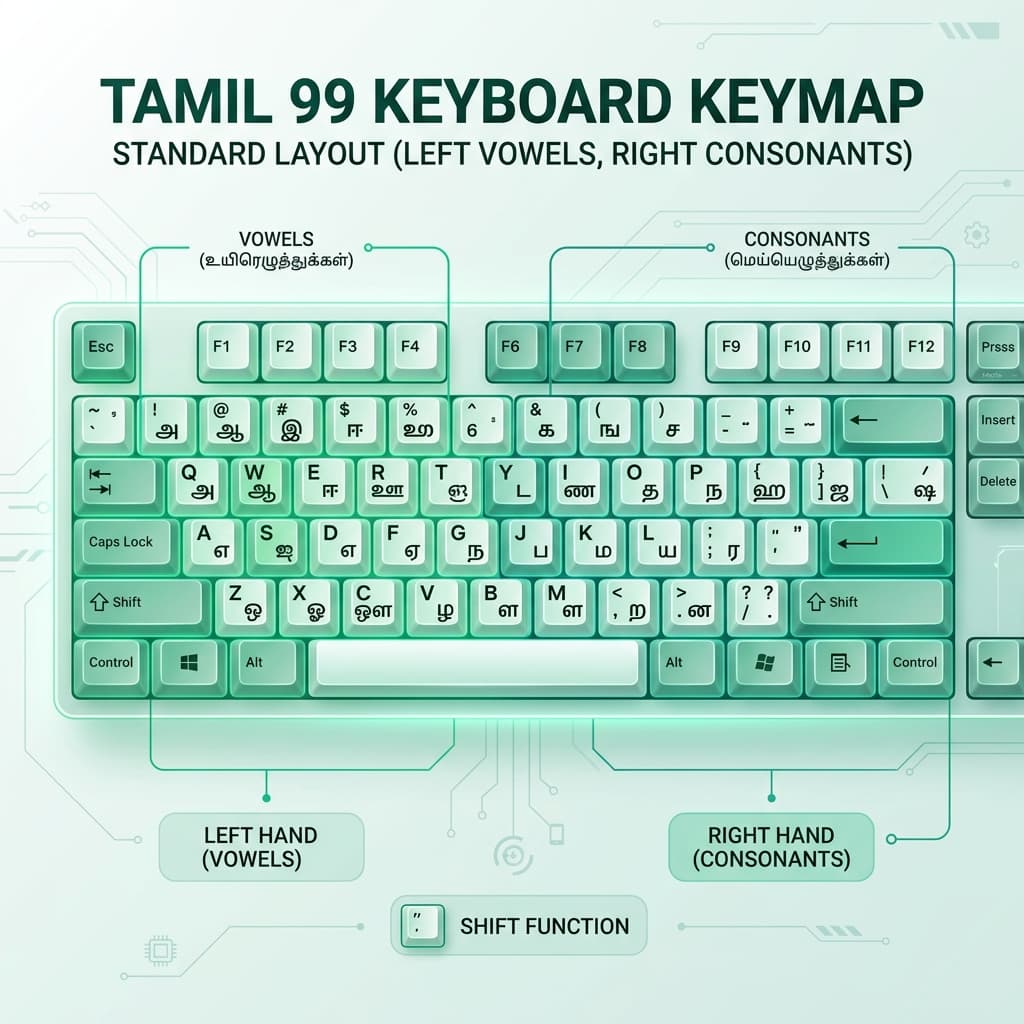
History & Origin of the Tamil 99 Layout Standard
Prior to 1999, digital Tamil typing was plagued by dozens of incompatible font encodings (such as Bamini, TSCII, TAB, TAM, and Vanavil), each utilizing completely different keyboard layouts on mechanical typewriters and early computers. This fragmentation severely hindered digital governance, publishing, and internet adoption across Tamil-speaking regions.
In June 1999, the Government of Tamil Nadu convened an international conference of linguistic experts, computer scientists, and typists under the guidance of the Tamil Virtual Academy. The committee evaluated dozens of layout submissions and officially adopted Tamil 99 under Government Order (G.O. Ms. No. 17) as the standard layout for all government offices, schools, universities, and public institutions.
Ergonomic Design Rules of Tamil 99
Tamil 99 was engineered specifically for touch typists using standard hardware QWERTY keyboards based on extensive linguistic keystroke frequency analysis:
- Left Hand = Vowels (உயிரெழுத்துக்கள்): All 12 primary Tamil vowels (அ, ஆ, இ, ஈ, உ, ஊ, எ, ஏ, ஐ, ஒ, ஓ, ஔ) are mapped to the left hand area (Q, W, E, R, T, A, S, D, F, G, Z, X, C, V keys).
- Right Hand = Consonants (மெய்யெழுத்துக்கள்): Primary consonants (க், ங், ச், ஞ், ட், ண், த், ந், ப், ம், ய், ர், ல், வ், ழ், ள், ற், ன்) are positioned on the right hand keys (Y, U, I, O, P, H, J, K, L, N, M).
- Automatic Pulli Feature: When a consonant key is pressed followed by a vowel sign, Tamil 99 automatically combines them into the appropriate Uyirmei (உயிர்மெய்) letter without needing manual dot (புள்ளி) deletion.
- Minimal Shift Key Usage: Unshifted keys handle over 90% of everyday Tamil prose. Shift keys are reserved exclusively for rare Grantha letters (ஜ, ஷ, ஸ, ஹ, க்ஷ) and numerals.
Tamil 99 vs. Phonetic vs. InScript Comparison
| Feature / Metric | Tamil 99 Standard | Phonetic Transliteration | InScript Standard |
|---|---|---|---|
| Key Mapping Basis | Ergonomic Tamil sound frequency | English letter sound equivalents | Pan-Indian standardized layout |
| Learning Curve | Moderate (Requires 2–3 days practice) | Instant (Zero learning curve) | Steep (Complex key positions) |
| Typing Speed Potential | Very High (60+ Words Per Minute) | Moderate (30–45 Words Per Minute) | High (50+ Words Per Minute) |
| Govt Authorization | Official Tamil Nadu Govt Standard | De-facto Internet Standard | Central Govt (CDAC) Standard |
How to Enable Tamil 99 on Desktop & Mobile
On Windows 11 & Windows 10
Go to Settings > Time & Language > Language > Tamil (India) > Options > Add a keyboard, and select Tamil 99.
On macOS (MacBook / Mac mini)
Go to System Settings > Keyboard > Text Input > Edit > Add (+) > Tamil, and select Tamil - 99.