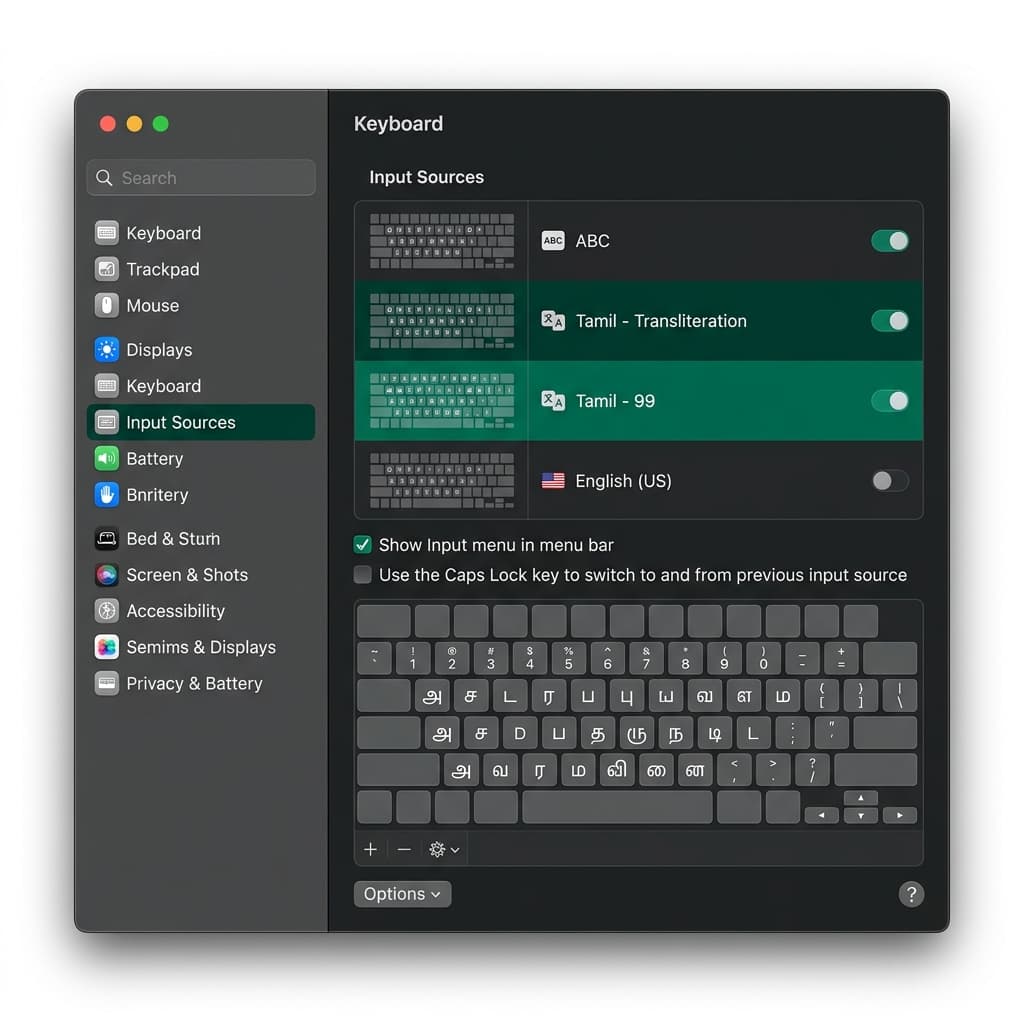
Native Tamil Language Support in macOS
Apple macOS has long provided built-in support for the Tamil script across MacBook Air, MacBook Pro, iMac, Mac mini, and Mac Studio devices. On macOS Sonoma, Ventura, Monterey, and Sequoia, Apple includes built-in Tamil Input Sources that render high-quality Unicode typography across Pages, Numbers, Keynote, Safari, Google Chrome, MS Office, and TextEdit.
Apple supports three distinct Tamil input layouts out of the box:
- Tamil - Transliteration (Recommended): Standard phonetic keyboard layout. Typing English letters phonetically generates corresponding Tamil script in real time (e.g. typing "vanakkam" converts to "வணக்கம்").
- Tamil - Anjal: Popular phonetic layout engine designed by Dr. Muthu Nedumaran, widely utilized across Southeast Asia and digital publishing.
- Tamil - 99: The official standardized layout authorized by the Tamil Nadu Government, placing vowels on the left side of the Mac keyboard and consonants on the right.
Step-by-Step macOS Configuration Guide
- Open System Settings: Click the Apple menu () in the top-left corner of your menu bar and select System Settings (or System Preferences on older macOS versions).
- Navigate to Keyboard Settings: Scroll down the left menu sidebar and select Keyboard.
- Access Input Sources: Locate the Text Input section on the right pane and click the Edit... button next to Input Sources.
- Add a New Input Source: In the bottom-left corner of the dialog, click the Plus (+) button.
- Search & Add Tamil: Type Tamil in the search bar. Select Tamil from the language column, choose Tamil - Transliteration or Tamil - 99 from the right column, and click Add.
- Enable Menu Bar Indicator: Check the box labeled Show Input menu in menu bar. This places an input indicator flag/icon near your Mac clock for easy single-click layout toggling.
Essential macOS Keyboard Shortcuts Cheat Sheet
Master these native macOS shortcuts to switch between English and Tamil input seamlessly while typing:
| Shortcut Key | Action / Result | Notes / System Compatibility |
|---|---|---|
| Control + Option + Spacebar | Select Next Input Source | Standard macOS hotkey to cycle through active input sources |
| Globe Key (🌐 / Fn) | Toggle Next Source | Available on modern Apple Silicon Mac Keyboards & Magic Keyboards |
| Control + Command + Spacebar | Character Viewer | Opens Apple Emojis & Tamil Unicode symbol palette |
Troubleshooting Tamil Rendering & Typing on Mac
Issue 1: Caps Lock key toggles input source instead of capital letters
Solution: In System Settings > Keyboard > Text Input > Edit, uncheck the setting labeled Use the Caps Lock key to switch to and from previous input source.
Issue 2: Tamil characters overlapping in third-party text editors
Solution: Ensure your document uses Apple's system Tamil font InaiMathi or standard Google font Noto Sans Tamil. Older legacy fonts lack proper OpenType complex script positioning rules.
macOS Native Input vs. TamilKeyboard.in Web Tool
While macOS native input sources are ideal for everyday Mac users, installing input sources requires navigating macOS System Settings.
If you need to quickly compose a short Tamil note, email, or WhatsApp message without altering your Mac system preferences, simply use TamilKeyboard.in directly in Safari or Chrome.