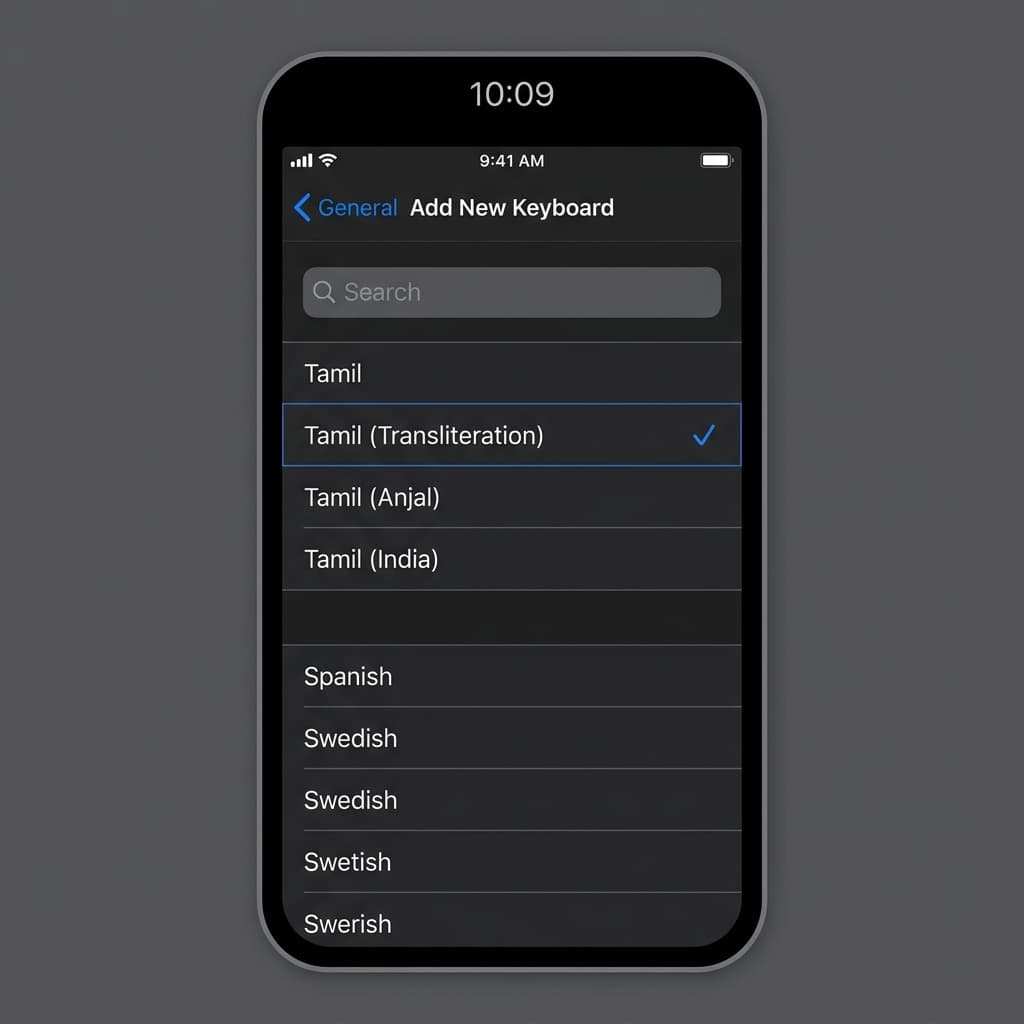
Native Tamil Language Support on Apple iOS & iPadOS
Apple provides industry-leading multilingual input support built directly into iOS and iPadOS operating systems across all iPhone (iPhone 16, 15, 14, 13, SE) and iPad devices (iPad Pro, iPad Air, iPad mini). With iOS native Tamil keyboard support, you can compose messages in iMessage, WhatsApp, Notes, Mail, Instagram, Safari, and X (Twitter) without downloading unverified third-party keyboard apps.
Apple supports three distinct Tamil input choices on iOS:
- Tamil - Transliteration (Recommended): Standard phonetic keyboard layout. Typing standard English letters automatically converts to native Tamil script with real-time word candidates above the keyboard (e.g. typing "vanakkam" converts to "வணக்கம்").
- Tamil - Anjal: Popular phonetic layout engine designed by Dr. Muthu Nedumaran.
- Tamil - Standard (Tamil 99): Full native character keyboard showing Tamil vowels and consonants directly on touchscreen keys.
Step-by-Step iPhone & iPad Setup Guide
- Open Settings App: Tap the grey Settings (⚙️) icon on your iPhone or iPad home screen.
- Navigate to General: Scroll down and tap on General.
- Select Keyboard Options: Tap Keyboard, then tap Keyboards at the top of the screen.
- Add New Keyboard: Tap Add New Keyboard... located at the bottom of your current keyboard list.
- Search for Tamil: Swipe down or type Tamil into the top search bar.
- Select Layout Engine: Select Tamil, check the box next to Tamil - Transliteration (or Tamil - 99), and tap Done in the top-right corner.
iOS & iPadOS Keyboard Hotkeys Cheat Sheet
Master these iOS shortcuts and gestures for fast bilingual typing on iPhone touchscreens and iPad hardware keyboards:
| Hotkey / Gesture | Action / Result | Usage Context |
|---|---|---|
| Tap Globe Icon (🌐) | Cycles to next language | Located in bottom-left corner of iOS keyboard |
| Hold Globe Icon (🌐) | Opens Language Selection Menu | Allows selecting specific keyboard directly |
| Control + Spacebar | Switch Keyboard Layout | For iPad Magic Keyboards & Bluetooth hardware keyboards |
| Tap Dictation Mic (🎙️) | iOS Voice Dictation | Dictates Tamil speech into written text in real time |
Troubleshooting Common iOS Tamil Typing Issues
Issue 1: Words are auto-correcting to English words automatically
Solution: Tap the candidate word in the top suggestion bar before pressing spacebar to teach iOS your custom vocabulary, or turn off Auto-Correction under Settings > General > Keyboard.
Issue 2: Globe key missing from bottom bar
Solution: The Globe icon only appears when more than one keyboard is active under Settings > General > Keyboard > Keyboards. Ensure Tamil is added to your active keyboards list.
iOS Native Input vs. TamilKeyboard.in Web Tool
While adding native Tamil keyboards in iOS settings works globally, setting up system keyboards requires navigating iOS settings screens.
If you need to quickly write a short Tamil note or message on an iPhone without changing system settings, simply open Safari and navigate to TamilKeyboard.in. Type phonetically and tap Copy Text to paste directly into your chat.